Chamet Agency App - Download & Login Guide for New Agents
Ever wondered how some people turn their smartphones into a full-scale business? Become chamet agent and start your earning journey even without showing your face on camera. Learning how to become a Chamet agent is your first step toward financial freedom.
Chamet is a global networking platform that connects people through video calls and live streams. It offers a huge opportunity for those who want to manage talent.
In this guide, we will share everything you need to know about how to become a Chamet agent and how you can maximise your earnings
- 1. What Is a Chamet Agent?
- 2. Why You Should Consider Becoming a Chamet Agent
- 3. Step-by-Step: How to Become a Chamet Agent
- 4. Understanding the Chamet Agency Dashboard
- 5. How to Recruit and Manage Hosts
- 6. Chamet Agent Commission Structure Explained
- 7. Rules and Regulations for Chamet Agents
- 8. Tips for Success as a New Chamet Agent
- 9. Frequently Asked Questions
- 10. Important Disclaimer & Conclusion
Chamet Agency App Login - Step-by-Step Instructions
Ready to join the world’s most vibrant video community, but not sure where to start? Whether you're looking to make global friends or build a profitable income source, this step-by-step Chamet app download guide will get you connected and help you with earnings. It includes everything you need to know about the Chamet agency app.
In this guide, we will share everything to help you get started, from downloading the application to completing the registration process.
Why You Need the Chamet App
Let’s first understand the important factors why people are switching to Chamet. Unlike other social media, Chamet focuses on real-time video interactions. It offers:
- 1-on-1 Video Calls: Get personally connected with people worldwide.
- Live Party Rooms: Here, up to five people can connect on a video call.
- Real-time Translation: A feature that removes language barriers for users.
- Beans Earning Opportunities: A host and agent can earn "Beans" that convert into real money.
Chamet App Download: For Users
Start by Chamet download, just make sure you are getting the official version.
For Android Users
For India: ChillChat is available for the Indian audience instead of Chamet. Search for “ChillChat - Live Chat & Game” on the Play Store and install the app.
For Other Countries: Open your Play Store app and search for "Chamet - Live Chat & Party." Click install, and the app will automatically set up on your device.
For iOS (iPhone/iPad) Users
For India: ChillChat is available for the Indian audience instead of Chamet. Search for “ChillChat - Live Chat & Game” on the Apple App Store and install the app.
For Other Countries: Open the Apple App Store and search for "Chamet - Live Chat & Party." Tap "Get" and verify with your FaceID or Apple ID password.
Create your account - Chamet Agency App Login
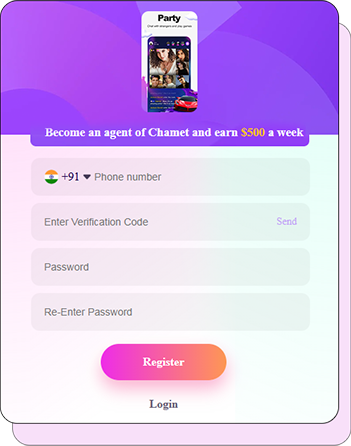
Register as an Agent
Follow the steps below to get registered as a Chamet Agent:
- Open Agency Registration Link
- Enter Your Phone Number
- Click on "Send"
- Enter the Verification Code
- Enter Password
- Re-enter Password
- Click on "Register"
Bind Metwallet with a Chamet account
- Go to your Agency Dashboard.
- Click on My Profile.
- Scroll down and click on Bind Metwallet.
Metwallet Sign Up Process
The agent must bind the Chamet account with the Metwallet App using the same phone number/ email address. Follow the steps to connect to the Metwallet app.
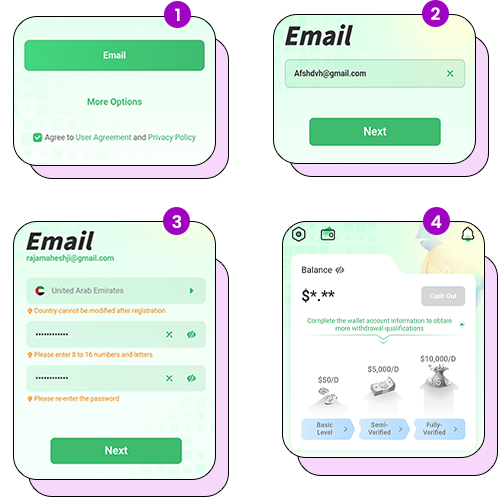
- Log in with your phone number/email address.
- out the details and click on "Next".
- After completing the signup process.
- Click on the three lines in the top left corner.
- 1st step - Fill in the basic details.
- 2nd step - Verify with any government ID and upload the front page of the same
- 3rd step - Submit the address proof from the government ID.
- Complete the registration process.
Create your account - Register as Chamnet Host
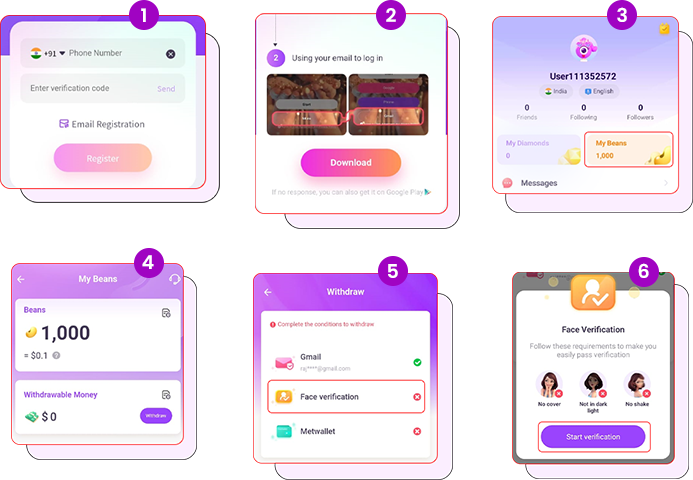
- Open Host Registration Link
- Verify your phone number/email address
- Download the Chamet App.
- Log in with a verified number/email address
- Complete face authentication:
- Click on "My Earnings" from the Profile options
- Click on the "Withdraw" button
- Select the "Face Verification" option and follow the process.
Bind Metwallet with a Chamet account (Host)
- Go to "Beans" in your profile.
- Click on "Withdraw" and then "Bind Metwallwet".
(This option will only be available once you reach $10, the minimum withdrawal amount.)
The Chamet Agency App: Managing Your Business
If you are an agency owner, you will be using the Chamet agency app dashboard more frequently. This portal is where you track your team's performance.
Chamet Agency App Download & Access
- Visit the Chamet Agency Dashboard link.
- You need to log in with the same phone number and password that is used for Chamet login.
- Here you can daily manage your hosts' live hours and their earnings.
Troubleshooting Common Login Issues
The most common issues that you may face while logging in to the app:
- Password Issue: Many users re-enter the wrong password while submitting the login details.
- OTP Not Received: If you aren't getting the SMS code, check your network signal or wait 60 seconds and try again.
- Password Forgotten: Click the "Forgot Password" link on the login page. You can reset it using your registered phone number or email.
Know the Application Interface
To help you better know the platform, the following are the details of the main page:
- Home: This is where you see popular hosts and active live streams.
- Party: Join the section for group video chats and hang out with your friends.
- Messages: Your private inbox, chat with your friends and receive system notifications.
- Profile (Me): You see the personal details here, like the agency name, User ID, your earnings, etc.
Important Settings for Hosts and Viewers
To have the best experience after your Chamet download, you should change a few settings immediately.
1. Permissions
Approve these permissions to function. Go to Settings > Apps > Chamet and ensure to allow:
- Camera: For video calls and live streaming.
- Microphone: Required so others can hear you.
- Location: Helps the app suggest people nearby and improve connections.
2. Language Settings
Chamet supports a variety of languages. If you want to set any preferred language, go to Profile > Settings > Language and select your choice. This also affects the "Real-time Translation" feature during calls.
Important things to know:
Chamet make sure the application is safe for you to use. Make sure to follow these:
- Face Verification: If you are a host, you must complete face verification.
- Don’t Share Your ID: Never share your login password or verification codes with anyone.
- Report Misconduct: If any user violates community guidelines, use the "Report" button.
How to Earn After Your First Login
If your goal is to make money, the Chamet login guide is your first step.
- Go Live: The more you interact, the more gifts you receive.
- Collect Beans: Gifts earned from viewers are converted into Beans.
- Withdraw: You can withdraw the earnings after reaching the minimum amount of $10.
Frequently Asked Questions:
Q: Is the Chamet app download free?
A: Absolutely. The app is free to download and install. There are no charges for creating an account on Chamet as a Host or agent.
Q: Can I use one account on two phones?
A: Yes, you can use one account on different devices. But you can’t be active on both devices at the same time.
Q: How do I access the Chamet agency app dashboard?
A: You must register as an agent first. Then, you can log in to the agency dashboard link provided by your agency.
Summary
The Chamet app is a stage to show your talent and meet people from all over the world. This Chamet app download, login guide, and registration process are super simple and user-friendly.
If you are looking for a real career, the Chamet agency app gives you all the tools you need to build your own successful business.
Register today for amazing earning opportunities with the Chamet App. Always keep your app updated to enjoy the latest features and stay secure.